Specials
General Customization
Set a custom message that will always be shown by writing it in the last custom message field of the pids.
Only works for this list of pids:
Berlin (S-Bahn)
Berlin (Subway)
DB DSA+
Copenhagen (Metro)
Dutch (Bus)
Dutch (Tram)
Frankfurt (Subway)
Hamburg (Bus/Tram)
Hanover (Light Rail)
Izmir (Metro)
Karlsruhe (Light Rail)
Munich (S-Bahn)
Munich (Subway)
Nuremberg (Subway)
Rostock (Tram)
Rotterdam (Metro)
SNCB (single line - old)
Stockholm (Subway)
Trenitalia
WMATA
Set a line-specific custom message that will be shown for a line by using the first, second or third custom message field of the pids.
route number: custom message (Example: S1: This is a test message)
Only works for this list of pids:
DB (2016)
Dutch
Euston
Hamburg (Subway - New)
Hamburg (Subway)
Hamburg (Subway - Colored)
Munich (S-Bahn)
Polish (PKP-Style)
SNCB (single line)
Change the showing page by using the first, second or third custom message field of the pids.
page: page number (Example: page: 2)
Only works for this list of pids:
Athen (Suburban)
Berlin (S-Bahn)
Berlin (Subway)
DB DSA+
Copenhagen (Metro)
DB (big)
Hungarian
Karlsruhe (Light Rail)
Munich (S-Bahn)
ÖBB (arrival board)
ÖBB (departure board)
Portuguese (Departures)
Rotterdam (Metro)
Ruhr
SNCB (board)
SJ (Statens Järnväg)
Change the position of the car-icons by using the first, second or third custom message field of the pids.
icon: front/rear (Example: icon: front)
Only works for this list of pids:
Hamburg (S-Bahn)
Munich (S-Bahn)
Change the number of rows showing by using the first, second or third custom message field of the pids.
rows: number (Example: rows: 3)
Only works for this list of pids:
Berlin (S-Bahn)
DB (big)
Munich (S-Bahn)
Ruhr
Change how the arrival time is displayed by using the first, second or third custom message field of the pids.
show_minutes
Only works for this list of pids:
Blackbox Landscape LCD
DB DSA+
Karlsruhe (Light Rail)
Ruhr
Change how the arrival time is displayed by using the first, second or third custom message field of the pids.
show_hh_mm
Only works for this list of pids:
BART
Karlsruhe (Light Rail)
PIDS Specific Customization
Features:
Shows the NS-Logo near the route number
sign: yes
Disables the train icons (useful, if the feature has bugs with your trains)
train: disable
Features:
Change the time before a platform is announced (showing the arrival in green)
plat_announce_time: seconds (Example: plat_announce_time: 300)
Change the direction the arrow points (while a platform is announced)
platform_top/platform_down/platform_left/platform_right: platforms (Example: platform_top: 2, 3)
Change the shown stations on the "next fastest train to"-screen
stations: list with station names (including: |, ||) (Example: stations: Euston, Central|Station)
Change the parts that the PIDS shows
active_parts: options (Example: plat_announce_time: clock, welcome)
(Options: clock,departures,further_d,fastest,welcome,arrivals)
Replace route numbers with custom logos
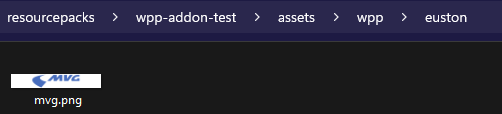
1. Create a resource pack containing an euston folder within a wpp folder in the assets folder
2. Create your custom logo in the euston folder and name it like your route name (best resolution: 422x65 px)
3. Activate it by writing active_icons: name in the first, second or third custom message field of the pids (Example: active_icons: mvg, awc)
Example: